A Contributor’s Guide for CASS Events
This serves as a guide to anyone creating or working with events on the CASS website. It includes information about both the content of event files and the “house style” used on the CASS site. Stylistic notes are marked as such. They should be followed unless there’s a compelling reason not to.
What to contribute
to be added
How to contribute
We prefer to use the usual GitHub pull request workflow (see parent page).
Templates
The file _events/TEMPLATE.md is a bare-bones event file template which includes all the keys described below, but without any content for them.
You may prefer to find an existing event similar to the one you want to create to use as a starting point for your new event.
Where to put your event file
All events should be in the _events directory. We use subdirectories to help keep things organized, usually associated with some of the long-running “series” by are one of the ways we group the events we organize, such as bssw-tutorial for the “Better Scientific Software tutorial” series, hpcbp-webinars for the “Best Practices for HPC Software Developers” webinar series, etc.
File naming conventions
Regardless whether they’re in the main directory or a subdirectory, event files should be given names that make them easy to identify and distinguish. You will see different naming conventions in different subdirectories, but generally, the give an indication of the series to which the event belongs or the host venue, the date on which the event occurred (or at least the year and month) and a short keyword or phrase identifying the topic. In some cases, for example SIAM conferences, each session has a unique identifier which is used visibly in the online agenda, etc. (for example, “MS22” where “MS” is short for minisymposium”). This contrasts with other events, such as the Supercomputing conferences, where there is a unique session ID, but it only appears in URLs, not in the public-facing program materials.
Using the draft event capability
Not yet supported on the CASS website.
Rendering of events on the website
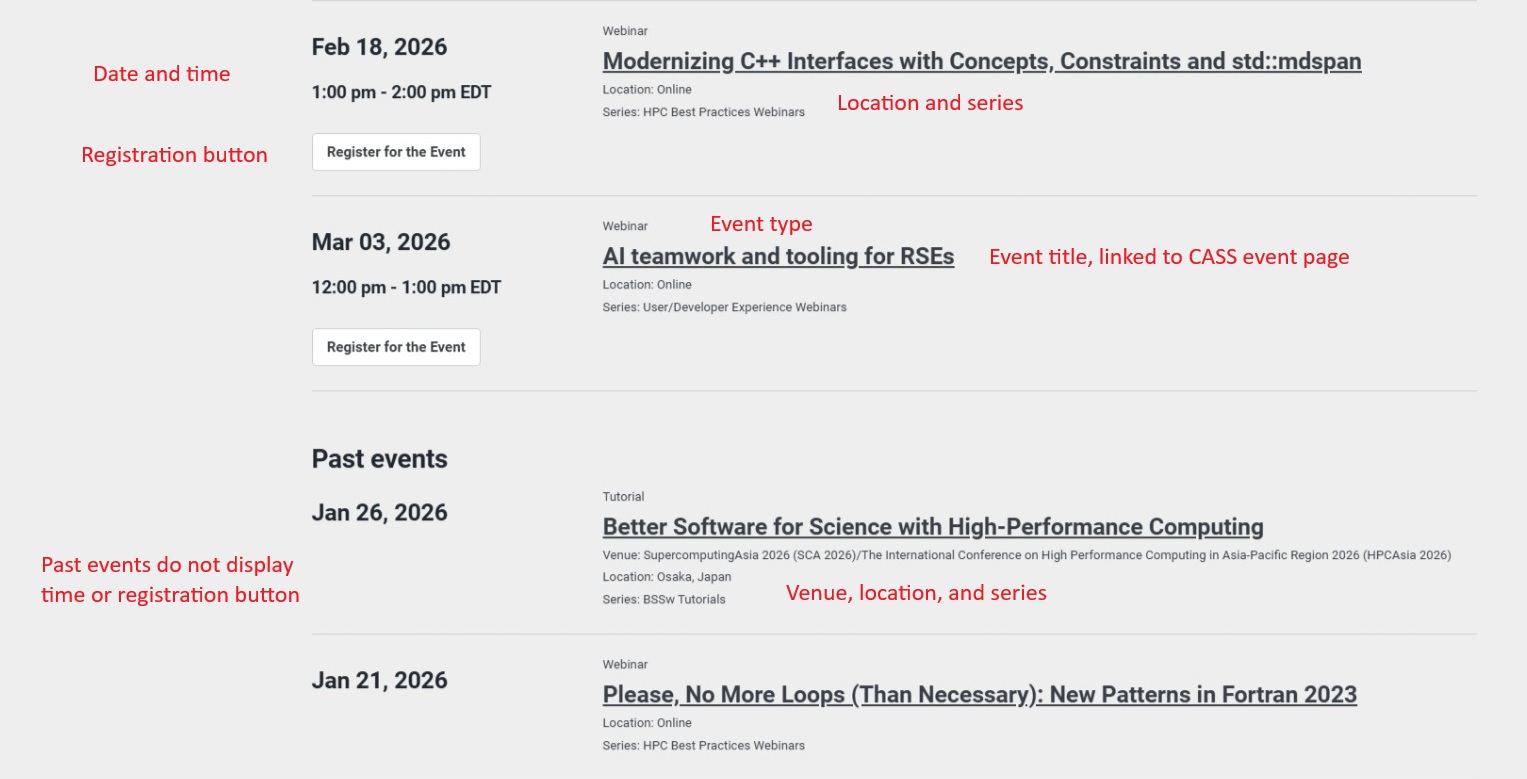
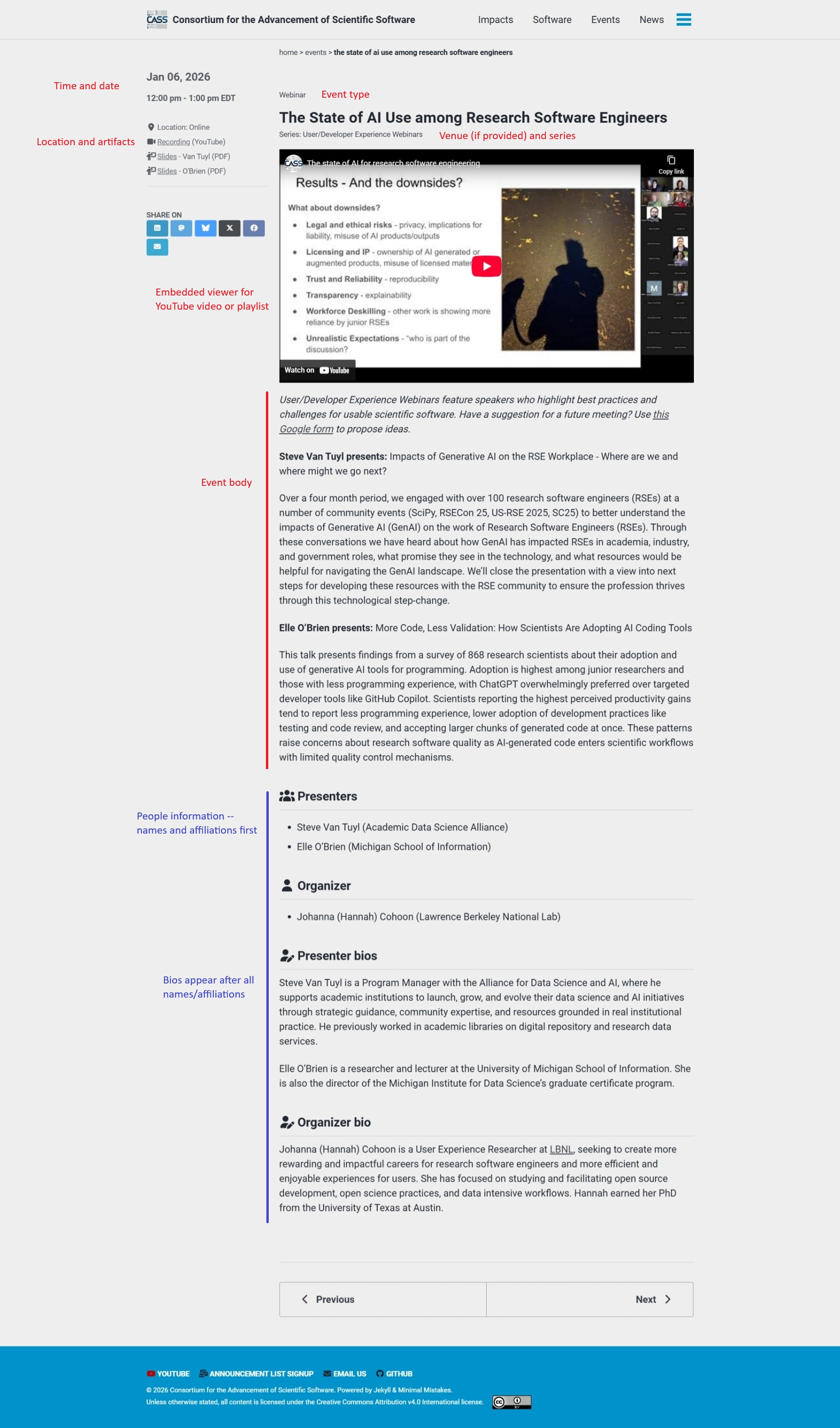
These screenshots illustrate how events are rendered on the CASS website (subject to change – hopefully the screenshots would also be updated). The annotations are meant to help connect the content that you see on the screen with the descriptions of the input that generates them, below.
Event collection listing
Individual event pages
Event file contents
Overview
The source for events on the CASS website are markdown files with YAML frontmatter. As far as the event processing for he site goes, most of the pertinent information is contained in the frontmatter. Typically, the body contains only an abstract or description of the event. In some cases, everything necessary is contained in the frontmatter.
Note that CASS event files are often used in the construction of other website too.
- The https://ideas-productivity.org/ (IDEAS) site uses the same event files
- The https://bssw-tutorial.github.io/ (BSSw tutorial) site uses a pure YAML data file which is trivially converted into an IDEAS/CASS event file by adding the frontmatter delineators (
---) before and after the file contents. - The event pages on the https://bit.ly/swe-cse-bof (SWE-CSE BoF) site are also structured to work as IDEAS/CASS events.
Such files often contain information which is not processed by the CASS site, but is used on these other sites. This interoperability is extremely useful in terms of reducing the level of effort required for events to appear in multiple relevant sites. Please be careful in modifying content which isn’t used on the CASS site.
There are several categories of information found in CASS event files. Terms used in this overview will be explained in greater detail below.
- Essential information includes the title, time and date, and the registration URL. There is also some metadata which should be included in the event, such as the “type” of event and “series” to which it belongs, and the CASS “activities” responsible for organizing the event.
- If the event is part of a larger conference or workshop, information about the hosting venue should be provided.
- The people involved in the event, including presenters, panelists, moderators, organizers, as appropriate. It is also possible to provide brief bios for any of these people.
- Artifacts arising from the event. When we organize events, we have a strong desire that they should produce artifacts which can later be referenced by participants and others. Such artifacts should be included in the event file as they become available, which of course is generally after the event has occurred.
- The body of the event file generally provides the description or abstract of the event.
Essential information
| Key | Presence | Description |
|---|---|---|
startdate |
REQUIRED | The starting date of the event, in ISO 8601 format (“YYYY-MM-DD”). |
enddate |
optional | The end date of the event, in ISO 8601 format (“YYYY-MM-DD”). The enddate is not needed for single-day events. |
time |
optional | The time frame for the event. Despite being technically optional, nearly all events will include a time entry. Exceptions would be multi-day events for which the time varies by day, or “umbrella” events which provide additional information about a group of events taking place in the same venue. |
registration_url |
optional | The url at which readers can register for the event, or which provides more information about the registration process. The field is expected for most upcoming events, but may be omitted if you’re adding past events for completeness. If the event is hosted in a larger venue (i.e., a conference), it is probably the overall venue registration link. |
location |
REQUIRED | The location of the event. See notes below for detailed guidance. |
type |
REQUIRED | The type or format of the event. We display the type near the title of the event in order to give the reader a better idea of what type of event they’re looking at. You should generally try to use the same types as for other events on the site for consistency, but it is okay to create new types if none of the existing ones fit. |
series |
REQUIRED | To aid reader navigation and association of related events, we also associate each event with a series, which is usually a “branded” collection of events which are in some way related. series is intended to be distinct from type, though in some cases, all events in a series will be of the same type. The CASS site also displays pages listing the events for specific series, along with additional descriptive information based on the corresponding pages in the _event-series collection. In this way, readers can focus on a particular series of events which may interest them, or share links to a particular series with colleagues. |
activities |
REQUIRED | The activities field is used to designate the CASS member organizations and/or working groups which have been involved in organizing the event. (The name of the field is a hold-over from terminology used on the IDEAS site.) The field may contain multiple entries. |
Additional notes
time
The time field should follow a specific structure:
“starttime - endtime timezone”
-
starttime and endtime must be 12-hour time representations
- with the meridian in lowercase (“am” or “pm”)
- with no spaces between the time and the meridian
- starttime and endtime must be separated by a dash (“-“) with a space on either side
Rationale: The above requirements come into play when there are multiple events on the same day. The event listing machinery breaks down the time so that the events can be ordered by starttime and then secondarily by endtime. If you don’t follow the requirements, you may notice that events on the same day don’t display in an order that you would expect.
- timezone must be an officially-recognized time zone abbreviation
- timezone must be correct with respect to daylight vs. standard time
- For conferences and such, timezone should be the same one used to display times on the venue program information
Rationale: The above requirements are intended to ensure there is no ambiguity in the timing of the event, recognizing that readers may be anywhere in the world. The website https://timeanddate.com is an excellent resource for ensuring you get the timezone right.
Good examples:
- “9:45am - 11:25am CST”
- “1:00pm - 2:00pm EDT”
- “9:30am - 4:30pm JST”
Bad examples:
- “9:45 am - 11:25 am CST” (spaces between time and meridian)
- “1:00pm-2:00pm EDT” (no spaces around dash)
- “1:00pm - 2:00pm ET” (not a proper timzone designation)
- “1:00pm = 2:00pm” (timezone missing)
- “1pm-2pm EST” (not using complete HH:MMp time designations)
- “1:00 - 2:00pm MDT” (not using complete HH:MMp time designations)
registration_url
If the registration_url is present and the event is in the future, the site will generally render it as a button labeled “Register for the event”. For past events, the registration_url is not shown, even if it is present.
Technical note: It is common for registration URLs to “rot” (become unresponsive) more quickly than most of the other links likely to appear in an event file. The link checker action for the CASS website is setup to ignore the patterns associated with registration links teleconferencing tools we often work with, but there are many others. It may become necessary to remove rotten registration_urls from past events if they start triggering the link checker.
location
Style notes: locations will be one of three types, formatted as follows:
- In-person only: “City, State” for events in the US, or “City, Country” otherwise. Spell out the state or the country rather than using abbreviations.
- Online only: “Online”. Do not use “Virtual”
- Hybrid: “City, State, and online” or “City, Country, and online”. Note comma after state or country and lowercase “online”.
type
The CASS site currently uses the following types
- Tutorial
- Webinar
- Birds-of-a-Feather Session
- Minisymposium
Additional reasonable examples include:
- Conference
- Workshop
- Online Panel Discussion
- Panel Discussion
- Paper Session
Style note: types should be very short and should be in title case.
series
The CASS site currently uses the following series
- BSSw Tutorials
- CASS BoF Days
- HPC Best Practices Webinars
- Technical Sessions and Meetings
- User/Developer Experience Webinars
The “Technical Sessions and Meetings” series tends to be a catch-all, covering many different types of events, whereas the others will (naturally) be of a single type. But not everything of type == "Birds-of-a-Feather Session" is necessarily part of the series == "CASS BoF Days" series.
New series can be created as appropriate. If you create a new series, you’re strongly encouraged to also create a page for it in the _event-series collection.
Filtering by series is based on exact matching.
Style note: series names should be short and should be in title case.
activities
At present, the activities field is not displayed on any public pages, and the information is intended for internal use within CASS.
This data is not currently validated in any way. However, for member organizations, you are strongly encouraged to match the site.data.organization.members.short_name entries found in the _data/organization.yml file). Working group names probably ought to be standardized against the name in the _working-groups collection, but current WG-led events don’t conform.
Venue information (optional)
Venue pertains to the parent conference, workshop, or other event of which the CASS event is part. Since many CASS events are standalone, the venue information is overall optional. The REQUIRED/optional notations below are based on the assumption that you have chosen to provide venue information.
| Key | Presence | Description |
|---|---|---|
venue |
REQUIRED | The is the name of the host event or institution. |
venue-url |
optional | A link to the hosting venue’s website. If it is provided, the venue name will be rendered as a hyperlink. |
Style note: We generally use the full formal name of the host conference conference rather than common abbreviations. For example, “SIAM Conference on Computational Science and Engineering (CSE25)” rather than “CSE25”. This will be more useful to readers who aren’t insiders and may not know the conference shorthand.
Additionally, the venue should be specific to a single instance of the host event. Usually that means including the year or something similar. For example, “SIAM Conference on Computational Science and Engineering (CSE23)” and “SIAM Conference on Computational Science and Engineering (CSE25)” are two distinct venues, as they should be. Whereas “SIAM Conference on Computational Science and Engineering” isn’t.
The venue-url should not be a link to the individual CASS event within the venue – that can be included in the artifacts field.
People information (optional)
The CASS event format recognizes a number of different groups of people who might be involved in an event. The are rendered on the event page below the body content.
The people categories are as follows (and displayed in this order on the event page):
presenterspanelistsmoderatorsorganizers
The data structures are the same in all cases, and support the following sub-fields:
-
name(REQUIRED) – the full name of the individual -
affiliation(optional) – the full name of the individual’s institutional affiliation. Multiple affiliations can be separated with commas -
bio(optional) – a short biographical sketch of the individual. Usually input in the form of a YAML block scalar (see example)
Note that when rendered on the site the bios are separated from the names and affiliations. In other words, we see the names and affiliations of the presenters, then panelists, etc., followed by the bios of the presenters, then panelists, etc. By moving the “bulky” text lower on the page, we can more readily see the essentials of all the people involved.
To give a full picture, here is an example of a single person’s information:
presenters:
  - name: Helen Kershaw
    affiliation: NSF National Center for Atmospheric Research
    bio: |
      Helen Kershaw is the Lead Software Engineer for the Data Assimilation Research Testbed, a widely used, open-source community software facility for data assimilation. Helen has a PhD in Mechanical Engineering from the University of Canterbury, New Zealand, and a Geophysical Science degree from the University of Leeds, UK. Helen has worked for a geophysical survey company that flew gravity and magnetic surveys and worked for several years in the Center for Computation and Visualization at Brown University before joining NSF NCAR.  Helen is one of the 2023 Better Scientific Software Fellows.
Of course the name, affiliation, and bio fields can be repeated as many times as necessary to list all the people in categpry. Note the leading - in front of the name key.
Style notes: names should be full names without titles – titles can be mentioned in the bio. Affiliations should be full institutional names rather than abbreviations (e.g., “NSF National Center for Atmospheric Research” rather than “NCAR”). Bios should not call out the individual’s name by bolding, italicizing, or other decoration.
Whenever feasible, please check with the people involved to ensure that the information is presented as they prefer rather than assuming you know. For example, someone may prefer to include their middle initial in their name. Some people hyphenate double-barreled surnames, while others do not.
Artifact information (optional)
The artifacts data structure is a flexible way to capture artifacts from an event so that they can be rendered systematically and consistently. Events are not required to have artifacts, but we encourage you to structure your events (the actual events, not these files) to produce artifacts and to capture them in the event file. This makes useful information available even to those who are not able to participate in the event. Most artifacts are added after the event is over, though some useful artifacts are available earlier.
Generally, entries in the artifacts structure involve a hyperlinked label with annotations following. You can include as many different artifacts as you need, in whatever order you consider most appropriate. On the website, artifacts are presented in a sidebar to the left of the main body of the event.
The basic artifact entry
The basic artifact entry looks like:
artifacts:
  - label: label text
    url: https://example.com/my_artifact
    note: note text
    icon: <i class="fa-solid fa-font-awesome"></i>
which would be rendered as ‘icon label text note text’. (Unforunately, the icon doesn’t render in this context.)
A specific example is:
artifacts:
  - label: Slides
    doi: 10.6084/m9.figshare.c.7699772.v5
    note: (Figshare)
  - label: Conference program page
    url: https://meetings.siam.org/sess/dsp_programsess.cfm?SESSIONCODE=82327
    note: (part 1)
  - label: Conference program page
    url: https://meetings.siam.org/sess/dsp_programsess.cfm?SESSIONCODE=82328
    note: (part 2)
label is required, while the others are optional. Yes, even the url is optional – you can create an artifact entry that is merely text, without a link if necessary.
The icon is optional, but if your label matches a label in the _data/icon-map.yml file, the corresponding icon from that file will be used. This is the preferred mode of operation in most cases and helps provide a consistent visual design across the site. If you’re not seeing the icons you expect, double check your label. Matches are exact (including case sensitivity). If you want to specify your own icon, it should be from the Font Awesome free collection.
The note field is optional, and is used to provide additional context to the artifact entry which is not part of the linked text. It is often used to indicate the format of the file at the given URL (e.g. “(PDF)” or “(PPTX)” or “(ZIP)”). In these cases, the parentheses are conventional. If you have multiple artifacts using the same label (e.g., multiple “Slides” or “Conference program page” entries), the note field is generally used to distinguish the similar entries. For example, adding the name of the speaker (and perhaps also the format), such as “- Van Tuyl (PDF)” or “- O’Brien (PDF)” (see https://cass.community/events/udx-2026jan-vantuyl), or adding details about the minisymposium comprising a multi-part SIAM conference session, such as “(part 1)” and “(part 2)” (see https://cass.community/events/siam-cse25-ms87). Note that when the artifact entries are rendered on the website, there is always a space between the label text and the note text.
format is a deprecated alternative to note that you may see in some existing events. It places the text in parentheses (i.e., “(note text)”). Obviously you can use note and put the parentheses into the note text if you want them.
Style note: because the artifacts are generally rendered in a relatively narrow sidebar, all text should be as succinct as possible. It is okay if the line wraps, but it looks better if it doesn’t.
Specialized artifact types
The artifacts structure also supports a number of specialized resource types from which it will product urls. The advantage of using specialized resources where they are appropriate is that special processing can be applied.
The following specialized resource types are currently recognized:
-
yt-video-idfor YouTube recordings. In addition to being rendered in the artifact list, when YouTube video artifacts are available, they are embedded at the top of the event page, before the body content. -
yt-playlist-idfor YouTube playlists. Playlists are treated like videos and embedded at the top of the event page, before the body content. -
doifor digital object identifiers. We always prefer DOI links over generic urls because they come with guarantees of permanence. -
bsswt-event-labelfor the event labels used on the BSSw tutorial site. On the CASS site, this produces a link to the appropriate tutorial page on bssw-tutorial.github.io. Its real value is that on the BSSw tutorial site itself, artifacts of this type are recognized and ignored so that the tutorial page will not link to itself while allowing the same file to be used on other sites.
Best practices for artifacts
Use the standard labels wherever possible (those in _data/icon-map.yml). This helps provide a consistent visual language of icons to represent different kinds of artifacts. If you’re not seeing the icon you expect (or not seeing icons at all), double check that your label exactly matches a label in _data/icon-map.yml. You can use the note field to provide additional information to augment the necessarily generic label.
Prefer dois to regular urls where DOIs are available. DOIs come with guarantees of permanence.
If your event is part of a venue with its own program information, you are encouraged to create an artifact linking to the appropriate program page. However, this should be a page specific to your event or an anchor on a page that points specifically to your event. Such an artifact is generally available well before the event takes place and can be useful in connecting readers to additional information.
Do not use artifacts to link to registration sites – there is a separate registration_url field (see above) which gets special processing.
Order your artifacts by their expected value to readers, with the most useful on top. Before an event, a link to the conference program page is probably the most useful (and likely the only) artifact. Afterward, videos and then slides, or other documents, are probably more useful than the conference program page.
Event body (optional)
Generally, the body of the event (after the YAML frontmatter) contains the abstract for, or a description of the event.
Style note: We do not include the word “Abstract” or “Description” at the start of the text.
Technical note: for some related sites, for technical reasons, this content is in a description field in the frontmatter instead of in the body. If a description key is present, the CASS site will use its content in preference to the body content.
Content for other sites
This section mentions briefly content you’re likely to see in multi-purpose event files which is not used by the CASS site. The main point is that these are important for related sites and if they’re present, you generally shouldn’t fiddle with them.
| Key(s) | Used by |
|---|---|
venue-type |
BSSw tutorials |
organizer-ids |
BSSw tutorials |
deadlines |
BSSw tutorials |
helpers |
BSSw tutorials |
short-affil and github-id in presenters
|
BSSw tutorials |
bsswio-topics |
IDEAS (HPC Best Practices webinars) |
qa-public-url |
IDEAS (HPC Best Practices webinars) |
survey-public-url |
IDEAS (HPC Best Practices webinars) |
parent-event-name |
IDEAS |
parent-event-file |
IDEAS |
header |
SWE-CSE BoFs |
title and url in presenters
|
SWE-CSE BoFs |